Removals CRM
A removal company CRM you can run from the van
Kwotly is a removal company CRM for UK firms running one to three vans: every enquiry, customer, message and booked job sits in one list on your phone. Enquiries land priced on your rates, the conversation stays under the quote, and the ones who gave their details but didn’t finish are kept so you can chase them. It’s free for 10 quotes a month, with no card.
No card needed. Then £39 or £79 a month, no contract.
Updated
What’s in it, and which plan has it
CRM is a fancy name for something simple: who asked you for a price, what you quoted, what they said back, when the job’s booked and whether it’s paid. Here’s where each bit lives.
- Every plan
Every enquiry, in one list.
Enquiries from your quote page land in Quotes, priced on your rates and sorted into New, Sent and Won. Phone and Facebook jobs go in the same list when you price them up yourself. Search a name or a route and it’s there.
- Every plan
The ones who didn’t finish, kept for you.
If someone gives their name and email and then stops, they land in Leads instead of vanishing. The chase email is written for you, you mark them chased, and a note keeps what they said when you rang. Enquiries that come in after your month’s quotes run out land there too, so you don’t lose the job.
- Every plan
Everyone who’s asked you for a price.
Customers lists each one with their number and email, how many quotes they’ve had, the jobs done and what you’ve earned from them. Ring them, open WhatsApp to them or open their last quote in one tap.
- Every plan, texts from Starter
Nudges, so nothing goes cold.
You get an email the moment an enquiry lands, and from Starter a text to your phone as well. If one sits for three hours without your price going out, Kwotly emails you a nudge. Home shows how many quotes need a price and how many sent ones are still waiting on a reply.
- Every plan
The conversation stays with the quote.
Write to the customer from their quote and it goes by email. When they reply to that email, it lands back under the quote, so the question about the wardrobe and your answer sit next to the price, not lost in your inbox. You can send the quote straight to their WhatsApp in one tap as well.
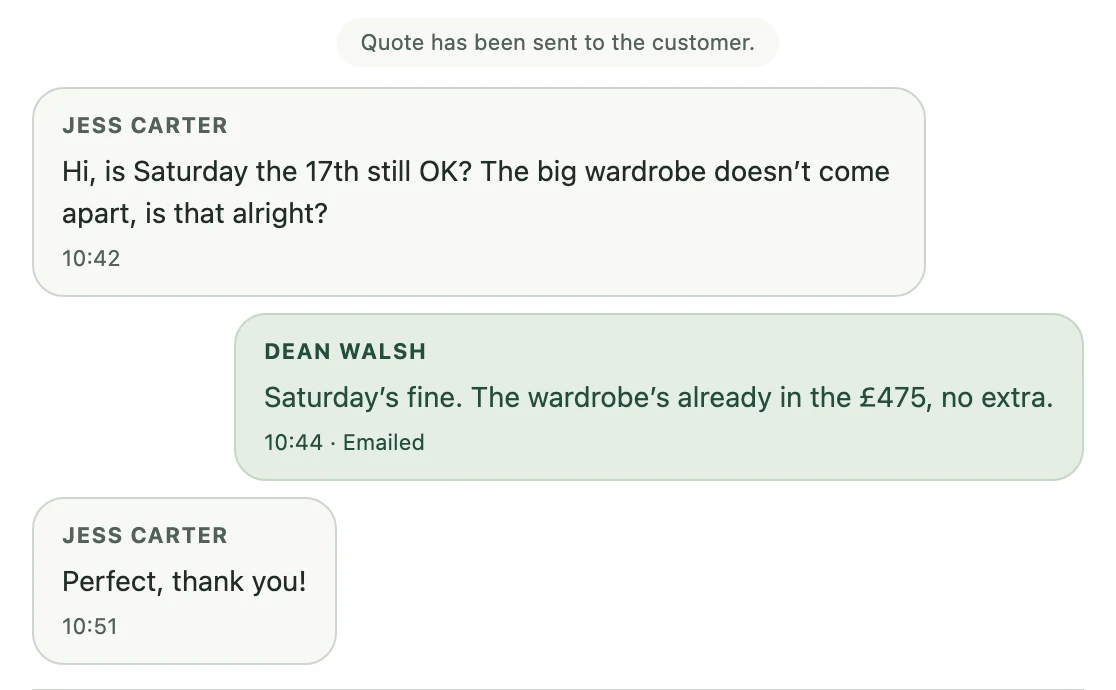
Jess replied to the email. It landed under her quote. - Booking on every plan, the diary from Starter
A yes becomes a job on a day.
Book it for a day, and a morning, afternoon or evening, and the customer gets an email saying so. Once they’ve accepted, they can ask for a day from their quote page and you confirm it. From Starter, Jobs shows your week or your month, how full each day is and the jobs still waiting for a day.
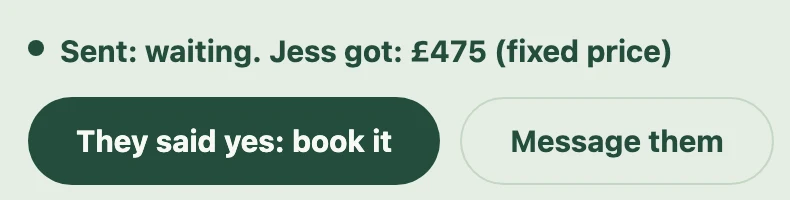
She said yes. One tap to book it. - Every plan
After the job, it’s still on file.
The job clock times hourly work on the day, and the invoice comes out of the same quote. Mark it paid and the customer gets one email asking how you did, with your Google review link if you’ve added it.
- Pro
Your mate sees the job, not your margin.
On Pro, your mates and the office get their own logins. Staff see the quotes, message customers and move a job along, but never see your margin.

Which plan has what
Everything you need to keep track of customers is on Free. Starter adds the diary and texts; Pro adds logins for your mates.
| Free | Starter, £39 a month | Pro, £79 a month | |
|---|---|---|---|
| Quotes a month | 10 | 100 | 300 |
| Your quote page, and every enquiry in one list | Yes | Yes | Yes |
| Unfinished enquiries kept, with the chase email written | Yes | Yes | Yes |
| A customer list with their quotes and jobs | Yes | Yes | Yes |
| Messages under the quote, their email replies included | Yes | Yes | Yes |
| Send the quote straight to their WhatsApp | Yes | Yes | Yes |
| An email the moment an enquiry lands, and a nudge if it waits | Yes | Yes | Yes |
| Book jobs, and let customers ask for a day | Yes | Yes | Yes |
| The job clock, and the invoice from the quote | Yes | Yes | Yes |
| Your week and month of jobs in the diary | No | Yes | Yes |
| A text to your phone the moment an enquiry lands | No | Yes | Yes |
| Texts the customer if the price changes on the day | No | Yes | Yes |
| Logins for your mates and the office | No | No | Yes |
Running more vans than that? Fleet is everything in Pro, with the numbers agreed for your size of firm. Every plan side by side.
What it doesn’t do
Better you hear it here than after you’ve put your customers in it.
No sales pipelines or mass emails.
It’s built round jobs, not a sales team. There are no deal stages, and no newsletter to every past customer. If you want that, a mailing tool does it better.
WhatsApp replies stay in WhatsApp.
Sending the quote opens WhatsApp on your phone with the message ready. What the customer sends back arrives in your WhatsApp, not under the quote. Email replies do land under the quote.
It reminds you, not the customer.
Kwotly nudges you about an enquiry waiting for a price, and writes the chase email for the ones who didn’t finish. It won’t chase a customer about a quote they haven’t answered. That ring is still yours.
It doesn’t sync with Google Calendar.
Booked jobs live in the Kwotly diary. Anything you put in Google Calendar or on the wall planner won’t show up here, and the other way round.
No dispatch board or crew rota.
It’s built for the van you’ve got. If you run a yard full of vans and need those, one of the bigger systems will suit you better. The round-up has them, with their prices.
Questions owner-operators ask
What is a CRM for a removal company?
It’s your list of who asked for a price, what you quoted, what they said back, when the job’s booked and whether it’s paid. The big sales CRMs add pipelines and deal stages for a sales team. A firm running one to three vans needs the useful middle of that, on the phone in your pocket. What a small firm actually needs.
How much does a removals CRM cost?
Kwotly is free for 10 quotes a month with no card, and the customer list, leads and messages are all on Free. Starter is £39 a month for up to 100 quotes and adds the diary, and Pro is £79 a month for up to 300 with logins for your mates. No contract, no lead fees. Every plan side by side.
Is there an app to download?
There’s nothing to download from the App Store or Google Play. Kwotly runs in your phone’s browser, and you can add it to your home screen so it opens like an app. Setting your rates up is easier sat at a laptop; checking a lead or answering a customer is a phone job.
Can I add jobs that come in by phone, Facebook or lead sites?
Yes. Price the job up yourself in the same place, see the price as you type, and it joins the list with everyone else. There’s no link to lead sites, so a job from one of those goes in by hand the same way.
Can I bring my old customer list across?
No. There’s no import, so the list starts with the next person who asks you for a price. Keep the old spreadsheet or notebook for past jobs; it’s the new ones that need chasing.
Can my mate or the office see the jobs?
On Pro (£79 a month), yes: they get their own logins. Staff see the quotes, message customers and move a job along, but never your margin. On Free and Starter, it’s just you.
Read next
- Removal company software for one-van firmsWhat the big tools do, what a one-van firm actually needs, and what is free.Read it
- The best removals software for small UK firmsEvery name side by side, with prices from their own websites.Read it
- How to get man and van work without paying for leadsWhere the work actually comes from, so the list has something in it.Read it
Start the list with your next enquiry.
10 quotes a month are free, with no card. Put your quote page link on your Facebook page tonight and see who turns up.
No contract. Cancel any time.